 The basics
 Advanced rendering
How to simulate water using shadersBy Pieter Germishuys, January 12 2006 |
Water.
Water overview
Water is a very interesting topic and almost certainly draws anyone?s attention.
I am going to explain a simple yet effective way of rendering semi-realistic water using the bump mapping article I wrote. It?s essential that you follow that tutorial since it shall be the base of this tutorial.
What can we use from our bump mapping tutorial?
So what have we learned from the previous bump mapping tutorial? We have learnt that we are able to give surfaces a raised look and that can come in handy not just for static surfaces but dynamic (movable) surfaces. One such surface is water.
Simple wave effect
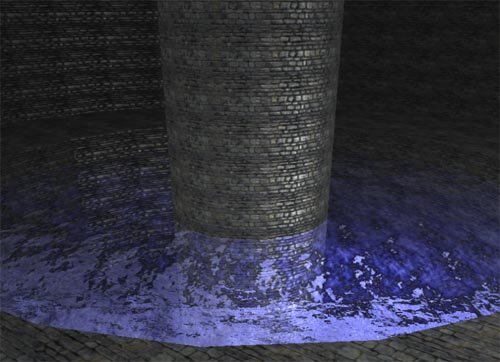
A very easy and simplistic way to recreate water is to have 3 textures that scroll over each other with a time lapse. Applying a normal mapping technique to this will give the water a raised feel and looking very good such as in this screenshot.
So all we do is add another variable to our bump mapping shader called time. In the pixel shader we will calculate 3 sets of normals using a time factor that will scroll the normal. You can add as many textures/normals as you like. I just picked 3 since it gives a really nice effect and doesn?t effect the performance of the application that much.
Adding color
I have chosen to use a cube map. A cube map is just a simple texture mapping technique that arranges textures to the faces of a cube. If you can imagine this, you can view 360 degrees if you look around you. To reflect this we have what we call a cube map that will map the entire environment to a single cube. Direct3d provides us with a easy to use texCUBE function that will extract the texture from the cube map.
Reflection
To properly display this cube map in the water we will need to calculate the reflection vector. The reflection vector is merely the change in vectors striking a surface.
So let's review the steps.
1) Get a time value (pass it to the shader)
2) Calculate 3 normals from the normal map using the normal mapping technique. These normals will be used as textures that scroll over each other giving us the
????nice moving effect of water
3) Use a cubemap to reflect the environment. Direct3d provides us with a way to get the reflection vector. reflect() does just that.
The rest is from the bump mapping tutorial
|
float4x4 ModelViewProj : WORLDVIEWPROJ; //our world view projection matrix texture texture0; //our texture |
that's it. Easy huh? If you have any queries/comments/suggestions please do not hestitate to contact me.
Files for this tutorial
| Filename | Size |
 ? Tutorial_Water_vs2003.rar ? Tutorial_Water_vs2003.rar
|
2.0 MB |
|
? Tutorial_Water_vs2005.rar
|
2.0 MB |